Highway Patrol Roblox Beginner Guide: What to Do First
A first-run guide to Highway Patrol on Roblox: set up your class, weapon and vehicle, run your first traffic stop, refuel on the way and drive toward the hostages.
To start patrolling in Highway Patrol [Alpha], you make three quick choices before the wheels move: select a class, equip a weapon in your loadout, and pick a vehicle. After that you drive a one-way highway toward its end — the endpoint where the hostages are held — policing traffic and watching for the Mafia criminals the game itself warns you about. Here is how that first run comes together.
Set up your officer before the drive
You join as a police officer, and the starting menus cover everything you need for the road:
- Class — pick the class you want to start the run with.
- Weapon loadout — equip a weapon right at the start; that is the gear you head out with.
- Vehicle — choose the vehicle you'll be driving on the highway.
If you want to know how vehicles are unlocked, our getting vehicles guide covers the details. For the first run, any loadout works — don't stall in the menus.
Start the run and watch the miles
The highway is one-way, so there's no route planning to do: follow it toward the end. A distance readout keeps you oriented during the drive — expect a miles-remaining counter such as "2.4 miles left" ticking down as you go.
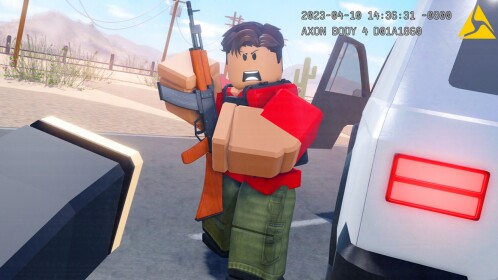
The drive isn't just driving. Criminals turn up along the route before you reach the hostages, and the Mafia are the headline threat the game's own description calls out. Stay alert, and when something suspicious rolls past, that's your cue for a stop.
Run your first traffic stop
Traffic stops are the main policing loop on the highway, and the game gives you everything you need to do one properly:
- Check the wanted sign, top left. It shows the vehicle description and license plate you're looking for.
- Match it before you pull anyone over. Read the plate and details on the car you're about to stop — skipping this check is how you end up detaining innocent drivers.
- Turn on the siren to make the car pull over.
- Order the driver out with prompts such as "Step out of the car," then "Search them" to check the suspect.
- Handcuff the suspect, place them in the back of your police car, and deliver them to a jail cell.
The on-screen prompts walk you through each order, so there's nothing to memorize before your first stop. You can also read more about the Mafia criminals you'll meet between stops.
The full first-run loop — joining, your first stop, and a fuel stop — looks like this in practice:
Watch your fuel
When a "Low fuel" warning appears, deal with it before pushing on. Drive to the gas station, line the car up with a pump so it sits at the tank, and fill up — you may need to nudge back and forth to get the position right. Then rejoin the highway and continue toward the end.
Expect a few Alpha rough edges
Highway Patrol is an Alpha build, and players have already hit two startup issues: spawning unable to move, which was fixed by leaving and rejoining, and an invisible barrier blocking players at the start area. If your character freezes the moment you spawn, rejoin once before assuming anything is broken on your end.
That's the whole first run: set up the officer, choose a vehicle, drive the one-way highway, stop the right cars, refuel on the warning, and keep going until you reach the hostages at the end. Once a stop or two feels natural, the rest of the route is that same loop repeated — and our hostage rescue guide follows it all the way to the finish.
Related Guides
Police Car Controls and Refueling
Drive the one-way highway, refuel on the low fuel prompt, use sirens to pull cars over, and fix a stuck car.
Mafia Criminals: Recognize and Survive Their Attacks
Spot the mafia incoming warning early, drive away or fight back, and still reach the end of the highway.
How to Save the Hostages at the End of the Highway
Clear the criminal hideout at the end of the highway, beat the captors, and free the hostages by direct interaction.